
Open the right kind of picker
Hold mode keeps selection fast. Double-tap Command opens a persistent searchable picker with filters.
Free clipboard manager for macOS
HotClip turns your clipboard into a fast local workspace: searchable history, pinned clips, OCR for images, snippets, paste queues, transformations, and privacy controls that stay on your Mac.
Inside the app
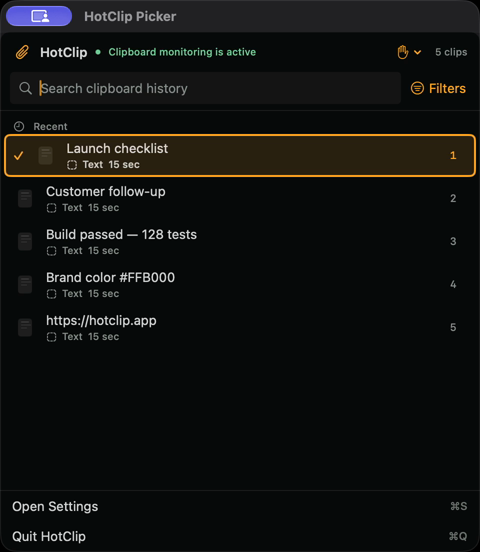
This is the current native picker: recent clips, keyboard selection, local monitoring status, search and filters in one compact Mac interface.
Why HotClip
HotClip still opens instantly from the keyboard, but the new design treats clipboard history as a place to search, inspect, clean up, queue, transform, back up, and automate without turning it into a cloud account.
Hold mode keeps selection fast. Double-tap Command opens a persistent searchable picker with filters.
Preview items, inspect sources, use OCR text, pin important clips, and run item actions from the picker.
Pause monitoring, ignore the next copy, reject sensitive pasteboard markers, and exclude specific apps.
How it works
HotClip keeps recent copied text, images, files and rich text ready to search and reuse. Open it from the keyboard, find the clip you need, then paste it back into the app you were using.
HotClip records supported clipboard items locally while it runs in the menu bar.
Use your shortcut to browse recent clips, search text, filter results or preview an item.
Choose a result from the keyboard and return to your work without hunting through old documents.
Features
The latest build brings the app's core workflows into one lighter interface: searchable capture, local intelligence, privacy controls, and utility actions that stay close to the keyboard.
Search by text and narrow results by content type, source app, age, or pinned status.
Apple Vision recognition runs on your Mac and makes screenshots searchable without replacing originals.
Keyword expansion supports date, time, clipboard, and cursor placeholders, with secure-field protections.
Build a temporary paste queue and send the next clip with Control-Option-Command-V.
Password-protected portable backups validate as a dry run before changing live history.
Shortcuts actions expose local history, snippets, pins, pause/resume, and clearing workflows.
Trust
HotClip publishes privacy details, release notes, a signed update feed, SHA-256 checksums, and workplace allowlist information so IT teams can evaluate the download without relying on a blind installer link.
Compare the current DMG against the published SHA-256 checksum before installing.
Use the workplace review page for the exact HotClip paths used by downloads and updates.
Privacy notes explain local clipboard storage, analytics limits, and update behavior.
Download
Version 1.0.27 for macOS 15 and newer. HotClip checks a signed feed and lets you review and install available releases in-app.
Download for Mac Free · macOS 15+ · Signed in-app updatesArchive
Need a previous build for testing or a managed Mac rollout? The archive keeps versioned installers with the changelog for each available release.
Allows automatic paste attempts to continue when another app reports Secure Input.
Download 1.0.27Adds Accessibility Mode, stronger VoiceOver feedback, appearance options, and refreshed picker/settings layouts.
Download 1.0.26FAQ
HotClip is a free Mac clipboard manager that keeps recent text, images, files and rich text searchable on your Mac so you can paste them again.
Yes. HotClip gives macOS 15 and later a dedicated, searchable history for copied text, images, files and rich text, with keyboard access and local privacy controls.
Yes. HotClip is free to download and use, requires no account and supports macOS 15 or later.
No clipboard content is uploaded during normal local use. History, search, OCR and transformations stay on your Mac by default; see the privacy policy for optional features and full details.
HotClip checks a signed Sparkle appcast and lets you review and install signed updates in-app.
HotClip is designed for common Mac clipboard content including text, images, files, and rich text.
Press Command-Shift-V, hold Command for the transient picker, or double-tap Command for the persistent searchable picker. You can change these controls in Settings.
Google Preferred Sources
Add HotClip as a preferred source for Mac guides, release notes, and product updates.